The fastest place to find web design clients is your own city: thousands of local businesses have no website, a broken site or a slow, outdated one — and every one of them is a potential client. You don't need paid ads, a big portfolio or a network of referrals to start. You need a repeatable way to find these businesses, reach them and show them what you can do.
In this guide, you'll get the 7 channels that consistently produce local web design clients, ranked by how fast they work for a freelancer or small agency. For each one you'll see exactly how to use it, with scripts, checklists and a simple weekly routine you can copy. No theory — just the steps that get you from "no clients" to a pipeline of leads.
Start with the right niches, not the right channel
Before you search anywhere, decide who you're looking for. "Web design clients" is too broad. Some businesses buy websites on the first call; others ghost you for months. Local service businesses with money but no marketing person are the sweet spot.
- Dentists, chiropractors, physiotherapists and other clinics
- Lawyers, accountants, insurance brokers
- Roofers, electricians, plumbers, landscapers and other trades
- Restaurants, cafés, bakeries and caterers
- Car repair shops, detailers, driving schools
- Salons, barbers, gyms and yoga studios
- Cleaning companies, movers, pest control
Niches that tend to need (and pay for) websites:
Pick one or two niches to start. When you pitch the same type of business repeatedly, your message, your examples and your pricing get sharper fast. If you're not sure which niche fits you, this guide to web design niche ideas breaks down which ones pay and how to choose.
The 7 best channels for finding web design clients
Here's the honest comparison, based on how quickly each channel can produce your first paying client and how much effort it takes:
- Outbound to businesses with bad or missing websites — fastest results, medium effort. You control everything: who to contact, when and how.
- Cold calling — fast feedback, high effort. You know within minutes whether a lead is interested.
- Cold email with follow-ups — scalable, medium effort. Works best when personalized.
- Referrals from past clients — easiest sales, slow to start. Only works once you have clients.
- Local networking and business groups — good relationships, slow pipeline.
- Social media content — builds trust long-term, rarely produces clients this month.
- Freelance marketplaces — quick start, but you compete on price with the whole world.
Channel comparison at a glance:
If you need clients this month, the first three are your channels. The rest are things you build on the side. The next sections show you exactly how to run the top three.
Channel 1: Build a list of local businesses that need a website
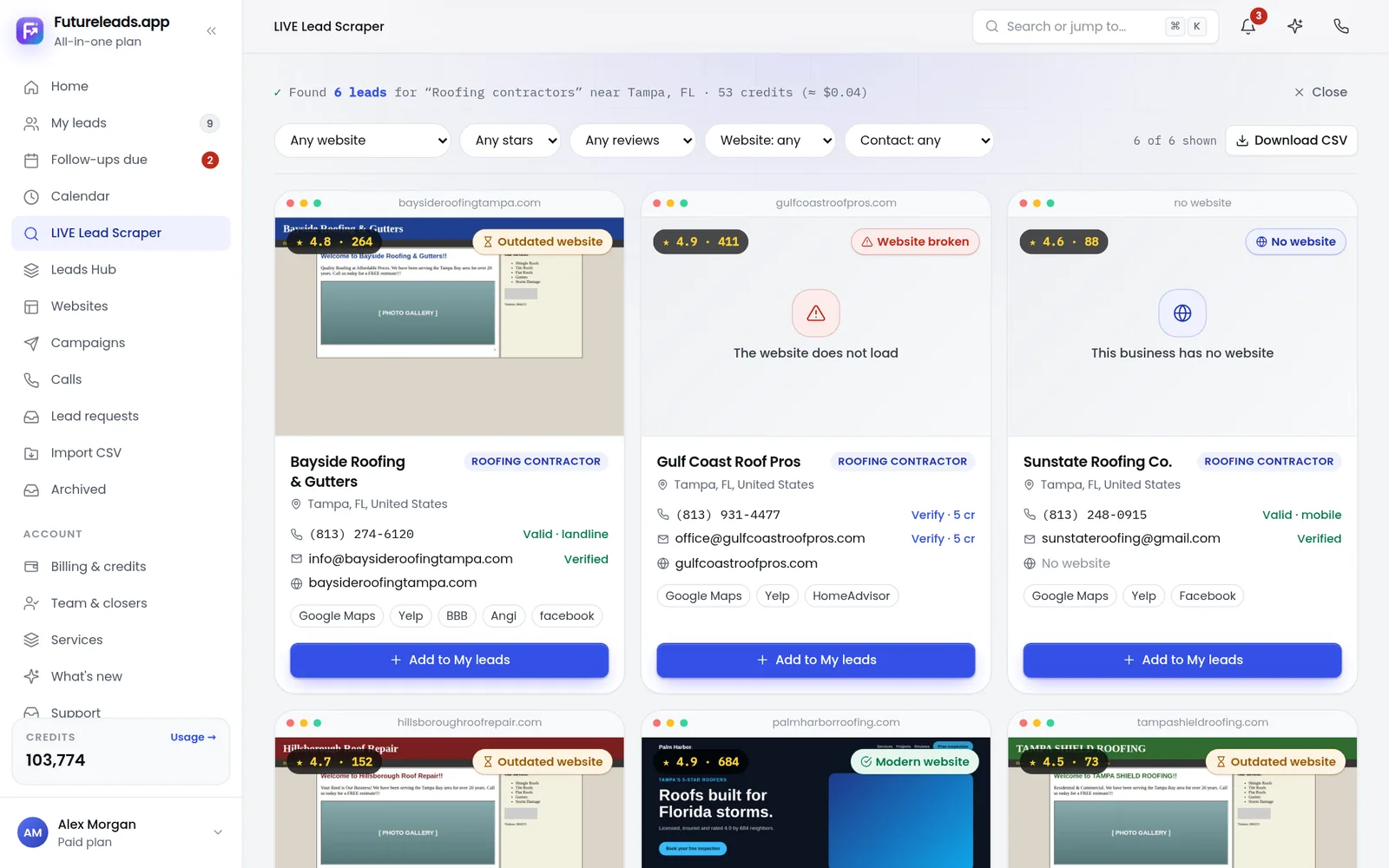
This is the core skill of selling web design locally. Your ideal prospect is a business that already spends money but has a weak online presence — no website, a site that isn't mobile-friendly, pages that load forever, or broken contact forms. Those problems are your pitch.
- Pick a niche and a city. Example: dentists in a mid-sized town near you.
- Search local business listings and local search results for that niche and city.
- For each business, check: do they have a website? Does it load fast? Does it work on a phone? Is the contact info easy to find?
- Record the business name, phone number, email and the specific problems you found.
- Aim for 20–50 qualified leads per week. That's enough outreach to keep a pipeline full without drowning.
How to build your first lead list:
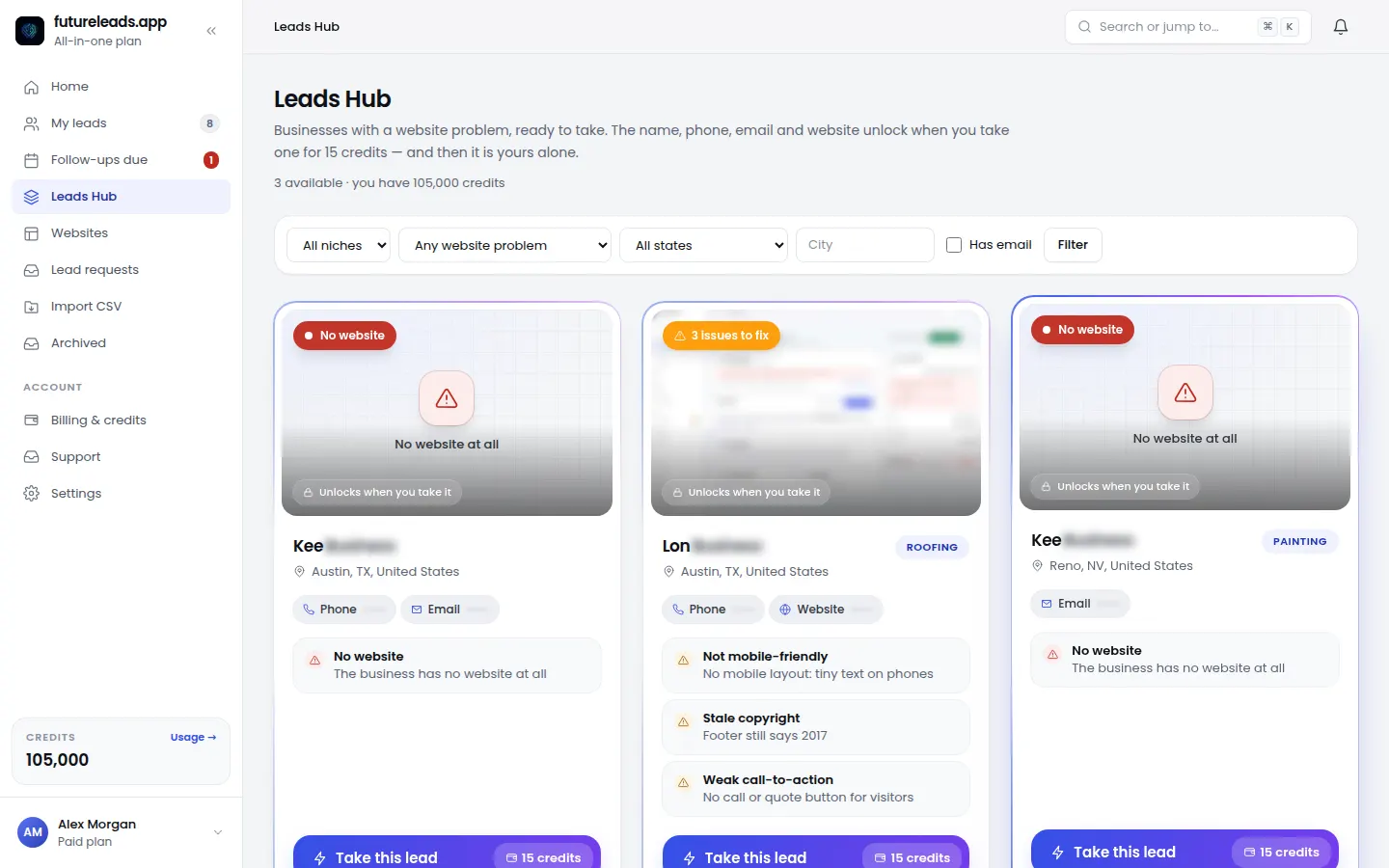
Doing this by hand works, but it's slow — checking every site, hunting for phone numbers, copying everything into a spreadsheet. This is exactly the problem Futureleads.app was built to solve: you search a niche and a city, and it shows you local businesses with no website or with slow, broken, not-mobile-friendly sites — including their phone, email and the specific problems found. You get a ready-to-contact Leads Hub instead of hours of manual checking. If you want the manual version first, this guide on finding local businesses without websites walks through it step by step.
Want to see who in your city needs a website right now? Start a free Futureleads.app account — no card needed — and run a live lead search today.
Find businesses that need a website — freeor claim up to 3,000 FREE credits with a paid planChannel 2: Cold email that doesn't look like cold email
Cold email works locally because your list is small and specific. You're not blasting 10,000 strangers — you're writing 30 short, personal emails to businesses in one town. The rule: lead with their problem, not your services.
Here's a template you can adapt. Keep it under 100 words:
Subject: Quick question about [Business Name]'s website Hi [Name], I tried to open your site on my phone and it took a while to load — I almost gave up. I'd guess some of your customers do the same. I'm a web designer here in [City], and I build fast, mobile-friendly sites for [niche, e.g. dentists]. I put together a quick homepage preview of what a new site could look like for [Business Name] — want me to send the link? [Your name] [City / phone]
Two things make this work: it mentions a real, specific problem, and it ends with a low-commitment question instead of "book a call." Then follow up two or three times over the next two weeks — most replies come from follow-ups, not the first email. You can copy a proven web design cold email template, sharpen your open rates with tested cold email subject lines for web design, and automate the follow-up sequence so no lead slips through.
Channel 3: Cold calling — still the fastest way to hear "yes" or "no"
Email is easy to ignore. A phone call isn't. If you're comfortable talking, calling is the fastest way to qualify leads: in a two-minute call you know whether the owner cares about their website or not.
A simple opening that works:
"Hi, this is [Name] from [Your Business] here in [City]. Am I catching you at a bad time? ... I'll be quick. I was looking at [Business Name] online and noticed your website seems to be down / isn't working well on phones. I help local [niche] businesses fix that so they stop losing calls to competitors. Would it be worth five minutes for me to show you what I mean?"
Expect mostly voicemails and a few hang-ups — that's normal, not failure. Track your calls, note objections, and improve one thing each week. If calls feel intimidating, this cold calling script for web design clients gives you the full flow including handling "I already have a guy," and this voicemail script turns hang-ups into callbacks. Futureleads.app has a built-in dialer, so you can click a lead and call straight from your browser with the call history and notes saved automatically — no spreadsheet gymnastics.
Skip the proposal: send a preview instead
Here's the mistake almost every new web designer makes: writing long proposals for leads who haven't shown any commitment yet. A proposal is a promise. A preview is proof.
- Pick one interested lead from your list.
- Build a simple homepage preview for their actual business — their name, their niche, their photos or stock images that fit.
- Host it at a private link (or generate a QR code) and send it with one line: "Here's a quick preview of what your new homepage could look like — no strings attached."
- On the follow-up, ask one question: "If we built the full site like this, would that be something you'd want?"
The preview-first workflow:
Seeing their own business on a modern homepage does what no pitch can. It moves the conversation from "should I even bother with this guy" to "how much and when." This is why Futureleads.app includes AI website previews: you can generate a homepage preview for a lead in minutes and send the link before they've paid you anything. Once they bite, move to a proper website design proposal template and price the project sensibly — this guide on how to price a website for a small business keeps you from undercharging.
Warm up your pitch with a quick audit
Before you contact any lead, spend two minutes checking their site. One specific, true observation beats any generic pitch. Use this checklist:
- Open the site on your phone — does it look broken or require pinching and zooming?
- How long does the homepage take to load? (If you get bored waiting, so do their customers.)
- Can you find the phone number or booking option within five seconds?
- Is the copyright year in the footer two or more years old?
- Do the contact or booking forms actually work? Try one.
- Is the business even on local search listings — and does the info match their site?
60-second website audit checklist:
Each check gives you a concrete line for your email or call: "Your booking form returns an error" lands much harder than "your site could be improved." For a deeper version, use this full website audit checklist for small business and this list of signs a business needs a new website.
Don't drop leads: track every contact in one place
The difference between designers who land clients and designers who don't usually isn't talent — it's follow-up. A lead who says "call me next month" is not a no. If your leads live in a spreadsheet, your notes in your phone and your emails in three inboxes, leads will fall through the cracks.
- One status per lead: new → contacted → replied → preview sent → proposal → won/lost
- A next-action date on every active lead (what you'll do and when)
- Notes per lead: what you found on their site, what they said, objections raised
- A weekly slot to follow up on every lead older than 7 days with no reply
Minimum tracking setup that works:
Futureleads.app gives you this in one place: lead statuses, notes, follow-ups and deals — plus a built-in dialer and email campaigns from your own accounts, so the tracking happens as you work instead of after. If you outgrow this, the guide on the best CRM for freelancers shows what to look for next, and these follow-up email templates revive leads that went quiet.
Your weekly routine: 7 hours to a full pipeline
Here's how to put the channels together into a repeatable routine you can run alongside client work:
- Monday (1–2 h): Build or refresh your lead list — 20–50 new qualified businesses in your niche and city.
- Tuesday–Thursday (3–4 h): Outreach blocks. Send 5–10 personalized emails a day and make 10–15 calls. Log everything.
- Wednesday (30 min): Build one website preview for the warmest lead of the week and send it.
- Friday (1 h): Follow up on every lead from 7+ days ago. Update statuses, set next actions.
- Monthly: Review what's working — which niche replies most, which message gets calls — and double down on it.
The weekly client-getting routine:
That's roughly a day of work per week for a pipeline that keeps producing. Once you have a few clients, add referrals and maintenance retainers on top — recurring revenue makes the whole business calmer, as explained in these website maintenance packages.
Mistakes that keep designers stuck at zero clients
- Pitching services instead of problems — "I build websites" gets ignored; "your site doesn't work on phones" gets replies.
- Waiting for the perfect portfolio — build previews for imaginary or real local businesses instead; your first client rarely asks for a portfolio.
- One contact, then silence — most clients respond on the second or third touch, not the first.
- Chasing every niche — one niche, one city, one message beats a scattergun approach.
- Quitting after week one — outbound has a lag. The routine above needs a few consistent weeks before the replies compound.
Avoid these and you're ahead of most beginners:
If you're starting completely from scratch, this guide on how to get your first web design client covers the basics in more depth, and how to start a website design business from home gives you the full setup in seven steps.
Ready to stop hunting and start pitching? Create your free Futureleads.app account — no card required — and find businesses in your city that need a website today. Paid packages start from $9.99/month when you're ready to scale.
Find businesses that need a website — freeor claim up to 3,000 FREE credits with a paid planPick a package: every feature is included in each, paid plans add FREE bonus credits every month, or start free with no card.
Basic
$9.99/month
11,500 credits a month
+ 1,000 FREE credits
- About 261 done-for-you leads
- or 88 AI website previews
- All features included
Pro
$39/month
50,000 credits a month
+ 1,500 FREE credits
- About 1,136 done-for-you leads
- or 384 AI website previews
- All features included
Premium
$79/month
105,000 credits a month
+ 3,000 FREE credits
- About 2,386 done-for-you leads
- or 807 AI website previews
- All features included
Frequently asked questions
Where do web designers find their first clients?
Most first clients come from outbound outreach to local businesses with no website or a bad one, plus the designer's own network. Cold email and cold calling to a targeted local list are the fastest starting points.
How do I find businesses that don't have a website?
Search local business listings and local search results for a specific niche in your city, then check which businesses have no site or a broken, slow or non-mobile one. Tools like Futureleads.app automate this and hand you a ready-to-contact list with phone numbers and emails.
Is cold calling still effective for web design clients?
Yes — for local businesses it's one of the fastest ways to qualify a lead, because you get an immediate yes or no instead of waiting on email replies. Use a short script and expect mostly voicemails at first.
How many leads do I need to contact to get one client?
It varies by niche, message and season, so don't fixate on a magic number. The practical approach is to contact 20–50 qualified leads per week, track your replies, and let your own numbers tell you your conversion rate after a few weeks.
Should I send a proposal or a website preview first?
Send a preview first. A homepage preview built for their actual business shows value before asking for commitment, and only move to a formal proposal once they've expressed interest.